The Crash We Couldn't Reproduce and the Keys We Never Mapped - Building an N64 Emulator in the Browser, Part 4
A crash we couldn't reproduce, textures that never get freed, and why keyboard input never worked: our config file named keys the emulator couldn't read.
Jake Berg
Part 4 of 4. Previous: Part 1: When the Compiler Said No · Part 2: Three Files and a Title Screen · Part 3: Audio, Input, and What We Didn't Solve
Part 3 ended with web64 rendering and playing sound, plus a table of five failed attempts at keyboard input. When we came back to it, there was a new problem on top: a report that the site takes down the whole computer. This part covers a day spent on both. We solved one of them.
Play it at web64.vercel.app. Click the page to start the sound (the sound drives the game), press Enter at the title screen, and use d for gas, s to brake, and the arrow keys to steer. Chrome or Edge on a desktop works best.
"It shuts down my MacBook"
The report: open web64 in Chrome, leave it alone, and after about 30 seconds it starts leaking memory so hard that it takes down a 16 GB M1 Pro MacBook Pro. No DevTools, no gamepad, and nobody touching it.
We'd already tried to fix it once. A commit from October capped the frame rate at 90 FPS, removed a second requestAnimationFrame loop that ran frames alongside the audio-driven loop from Part 3, and cleared the console every 1,000 log lines. The crash kept happening. That commit was a guess, and we didn't want to ship another one.
Crash-testing without crashing
The only way to reproduce a crash that takes down a machine is to run it on that machine, so first we built something that could pull the plug in time. A Node script drives a separate copy of Chrome with a fresh profile through puppeteer-core. It wraps the WebGL calls so it can count textures as they're created and deleted, and it samples memory every second.
The first watchdog used ps, and that had a blind spot. On macOS, ps doesn't count most of the memory the GPU process holds, so a graphics leak could take the machine down while ps showed nothing wrong. The watchdog now checks two other numbers:
const sysFree = () => Number(execSync('sysctl -n kern.memorystatus_level'));

setInterval(() => {
  const browserMB = footprintMB(browserPids); // from `top -l 1 -stats pid,mem`
  const free = sysFree(); // system-wide free memory, as a percentage
  if (browserMB > 3000 || free < 30 || startFree - free > 15) {
    process.kill(browserPid, 'SIGKILL');
  }
}, 1000);
Seven runs, no crash
We ran it seven times: in Chromium and in the installed Chrome, headless and in a window, with DevTools open, with the tab hidden, and against both the local dev server and the live site. We confirmed that the live site served the same bundle as the latest commit. An eighth run with Chrome's OpenGL backend instead of Metal didn't count, because the emulator never started.
Every run held 60 fps. Total browser memory stayed flat at about 550–850 MB, and free system memory never moved more than 3 points over 70–100 seconds. We couldn't make it crash.
What we did find
The runs turned up two real things.
The core keeps its textures. The pre-compiled core creates WebGL textures and almost never deletes them. After 90 seconds, about 2,200 were still alive, only 76 had been deleted, and the GPU process had grown by 30–75 MB, depending on the run. It might be a slow leak or a cache that never shrinks. Either way, it's far too slow to take down a machine in 30 seconds, and fixing it means rebuilding the core, which is what Part 1 was about avoiding.
Something changes at 30 seconds. If you leave Off Road Challenge alone, it plays a demo race, and the demo starts 25–35 seconds in. That's when the drawing work jumps, from about 5,000 draw calls a second to between 25,000 and 45,000. That's easy work for a GPU. But Chrome can quietly switch the whole browser to software rendering, usually after its GPU process has crashed. With the CPU doing the rendering, five to nine times the drawing work could be enough to freeze everything right around the 30-second mark. A fresh test profile never inherits that state, but an everyday browser with a couple dozen extensions might.
That's a hypothesis, not a finding.
What we shipped: a way to tell
Instead of another guess-fix, we added a readout. The stats toolbar now shows, in green, which GPU the browser gave the emulator, or a red SOFTWARE if Chrome has fallen back to the CPU:
const info = gl.getExtension('WEBGL_debug_renderer_info');
const renderer = String(gl.getParameter(info ? info.UNMASKED_RENDERER_WEBGL : gl.RENDERER));
const software = /swiftshader|software|llvmpipe/i.test(renderer);

gpuEl.textContent = software ? 'SOFTWARE' : (renderer.match(/Metal Renderer: ([^,]+)/)?.[1] ?? renderer);
gpuEl.style.color = software ? '#ef4444' : '#4ade80';
Next time it happens, the report can say which renderer it happened on. The rest of the checks need the browser that crashes: chrome://gpu, an Incognito window with the extensions off, and Chrome's Task Manager with the GPU Memory column showing, to see which process grows.
The crash is still open.
The input problem, solved
Now for the keyboard. Part 3's table listed five attempts: focus the canvas, point SDL at it, push events into SDL's queue, call SDL_PushEvent, and load N64Wasm's input_controller.js. The memory tests gave us another clue: the script pressed Enter and d to start a race, and the game never responded.
None of the five attempts touched the actual problem. SDL had been receiving the keys all along.
Which N64Wasm are we running?
The first step was to read how N64Wasm reads input. The catch is that its source has changed since our binary was built. Current N64Wasm writes a config.txt with 15 gamepad lines, and our copy of input_controller.js only knows about 11. Reading the wrong version of the source would give the wrong answer.
Git can tell you which version you have. git hash-object computes the same hash that GitHub records for a file at each commit, so we compared our n64wasm.wasm with dist/n64wasm.wasm across N64Wasm's history:
git hash-object public/n64wasm.wasm
# 9bd8b15497310d38cba41e381750058f4613f0cc

# The hash of dist/n64wasm.wasm at a given commit
curl -s "https://api.github.com/repos/nbarkhina/N64Wasm/contents/dist?ref=$SHA" \
  | jq -r '.[] | select(.name == "n64wasm.wasm") | .sha'
It matched exactly one commit: cc4d40ed34, "fixed flashram bug," from April 11, 2022. That's also the last time anyone pushed to the fork we had copied the files from. Now we could read the source for the exact binary we ship.
How the core reads keys
The core doesn't take input from JavaScript at all, and it exports no input functions. Every frame, it reads SDL's keyboard state and checks the keys it was told to watch:
keyboardState = (Uint8*)SDL_GetKeyboardState(NULL);
if (keyboardState[Mapping_Action_Start]) neilbuttons.startKey = true;
if (keyboardState[Mapping_Action_A]) neilbuttons.aKey = true;
Those Mapping_* values come from config.txt, which the page writes to the virtual filesystem before it starts the core. The core reads the file by line number: lines 0–10 are gamepad buttons, 11–29 are keys, and the rest are settings. Each key line goes through this function:
int getKeyMapping(std::string line)
{
    //remove carriage return
    #ifdef __EMSCRIPTEN__
    line.erase(line.size() - 1);
    #endif

    if (line.compare("ArrowLeft")==0) return SDL_SCANCODE_LEFT;
    // ...
    if (line.compare("Enter")==0) return SDL_SCANCODE_RETURN;
    if (line.compare("a")==0) return SDL_SCANCODE_A;
    // ... b through z, 0 through 9, and some punctuation

    //default
    return 0;
}
It expects the names the browser gives keys (KeyboardEvent.key), such as "Enter", "ArrowLeft", and "d", and turns each one into an SDL scancode.
What we were writing
Our config file had already done that conversion, and it wrote the SDL scancode numbers:
'40',   // Enter (Start)
'82',   // Up Arrow (Analog Up)
getKeyMapping doesn't know a key called "40", so it returns 0. Scancode 0 is SDL_SCANCODE_UNKNOWN, which is never pressed. Most of the 19 key lines ended up there. Four of them happened to be single digits, which are key names, so D-pad left was bound to the 5 key, Z to 7, R to 8, and A to 6. Every gamepad line was 0, which bound all 11 gamepad actions to the same button.
In other words, the 6 key should have worked as the A button all along. Nobody thought to press it.
The fix
The fix replaces the numbers with the key names N64Wasm uses by default. The controls table on the page already listed them:
'b',          // D-Pad Left
'n',          // D-Pad Right
'y',          // D-Pad Up
'h',          // D-Pad Down
'Enter',      // Start
// ...
'ArrowLeft',  // Analog Left
'ArrowRight', // Analog Right
getKeyMapping has one more trap. It removes the last character of every line, whatever that character is, because it assumes it's the \r from a Windows line ending. Our old file joined its lines with '\r\n', so the last line had no \r, and the core would chop off a real character. The last line was a number setting, so nothing broke, but a key name there would have lost its last letter: Enter would have become Ente. Now every line ends in \r\n:
const configString = configLines.map(line => line + '\r\n').join('');The gamepad lines got N64Wasm's defaults too (D-pad on buttons 12–15, A on 0, B on 2, Start on 9). We haven't tested those with a real controller yet.
The proof
We ran the same test on both versions: load the game, then press Enter four times. Each press was held for a quarter of a second so that it lasted at least one frame.
With the old config, the game stayed on PRESS START through all four presses. With the new one, it went to the main menu. From there, d (the A button) chose One Player, Just Play, a truck, a transmission, and a track, and the race started. Holding d and the arrow keys drove it:
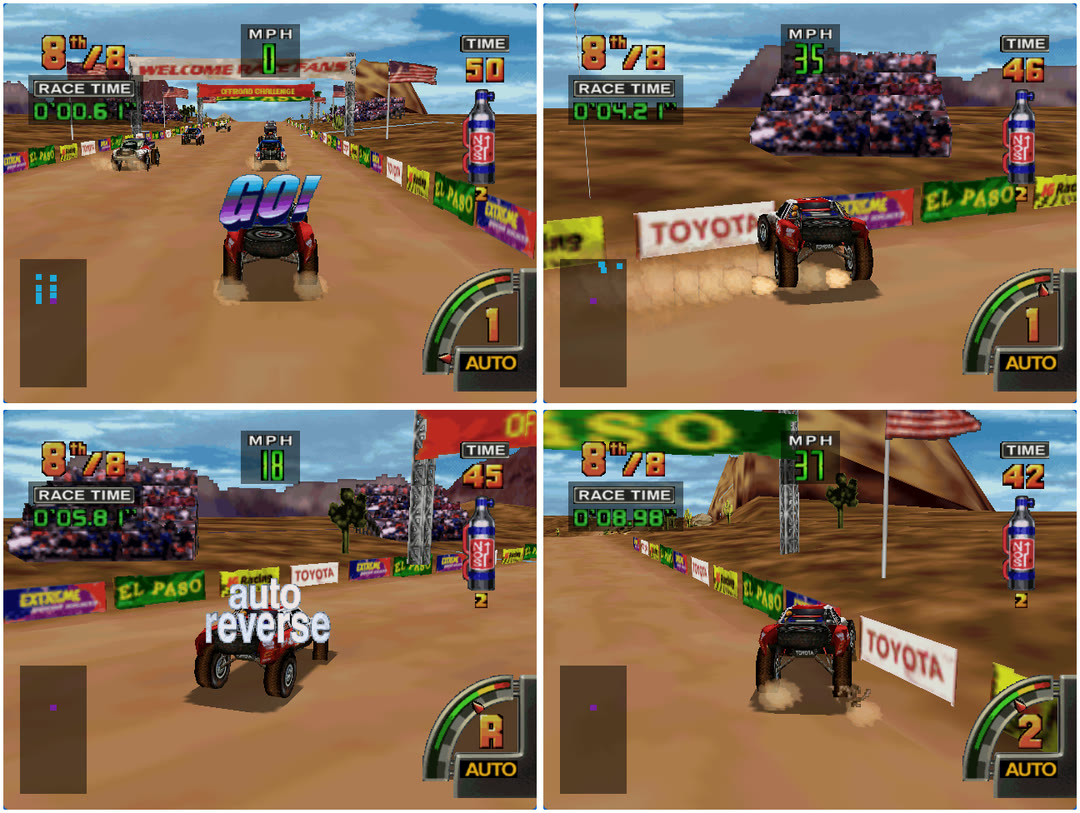
Gas off the line, a left turn at 35 MPH straight into the Toyota banner, auto reverse, and back up to 37 MPH.
So here's why each attempt in Part 3's table failed:
| Part 3 attempt | Why it didn't help |
|---|---|
| Make the canvas focusable and focus it | SDL listens on the whole window, so focus was never the problem |
Point SDL at the canvas with SDL_EMSCRIPTEN_KEYBOARD_ELEMENT |
Same reason |
Push events into SDL.events |
An SDL2 build has no window.SDL, and nothing imported this code, so it never ran |
Call SDL_PushEvent from JavaScript |
The core doesn't export it |
Load N64Wasm's input_controller.js |
It tracks keys in JavaScript, but nothing passes them to the core |
We deleted src/emulator/input.ts, the file that held attempts 3 and 4.
All five attempts were about how key events reach the emulator. The bug was in which keys we told it to watch. When input doesn't work, check the mapping before the plumbing.
Where it stands
- Keyboard works. We tested menus and racing in Chromium, and the fix is live at web64.vercel.app.
- Gamepad buttons now use N64Wasm's defaults instead of all being set to 0. They're untested with a real controller.
- The crash is still unexplained. The GPU readout is live, and the next step is a report from a machine where it happens.
- The texture buildup is real but slow, and fixing it means rebuilding the core.
- Audio still skips now and then, and saves still aren't built.
Next up: find out what the GPU readout shows on the machine that crashes, try a real gamepad, add saves, and finish a full race.
Resources
- web64.vercel.app: play it in your browser
- web64 on GitHub: our project
- N64Wasm by Neil Barkhina: the frontend and pre-compiled core. Our files come from jmallyhakker's fork, which stops at the April 2022 commit they match.
- ParaLLEl N64: the emulator core itself
Happy emulating!
Note from the author: This series was entirely created by AI. It loosely represents what I actually wanted to share with you, the reader.