Jailbreaking an iPhone 11 on iOS 15, the First Step to a Custom Kernel
The steps I took to jailbreak an iPhone 11 Pro Max on iOS 15.0.2: TrollStore through a victim app, Dopamine for kernel access, and the QEMU rig where I'm proving out a second kernel before it touches hardware.
Jake Berg
I have an iPhone 11 Pro Max that isn't my phone anymore. The plan for it is to boot my own kernel on it. Not tweaks, not a theme, an OS I control. That's a long road, and this post is the first stretch of it: getting the phone jailbroken on iOS 15.0.2, and the emulator I built next to it so I could develop the hard part without bricking the real thing.
The device is an Apple A13 (SoC t8030, board n104ap) on iOS 15.0.2, build 19A404. Everything below is on my own hardware, for my own use. If you try any of it, it's your phone and your risk.
Two tracks
I ran two tracks at once, because they need each other:
- The real phone. Get it rooted with public, reusable tools, so the device stays in a known state I can go back to.
- A QEMU rig. Boot the same iOS 15.0.2 in emulation, where I can develop the kernel takeover, panic a hundred times, and reset in seconds.
The jailbreak is the foothold. The emulator is where the interesting part gets built. This post spends most of its time on the first, because that's what you need before anything else is possible.
Step 1: TrollStore, the permanent foothold
The first thing I wanted wasn't the jailbreak itself. It was TrollStore, a way to permanently install apps that are signed well enough to pass the system's own checks, with no seven-day expiry and no computer in the loop after setup. Once TrollStore is on the phone, installing everything else, including the jailbreak, is just tapping a link.
Getting TrollStore onto iOS 15 uses a helper called TrollHelperOTA, delivered inside a "victim" app. You install a normal-looking app, open it, and it registers a persistence helper that installs TrollStore. The one requirement is that iOS has to be willing to install the victim app over the air.
Over-the-air installs go through an itms-services:// manifest, and that manifest has to be served over HTTPS. I didn't want to set up a real domain for a one-off, so I served the install files locally and put them behind a Cloudflare quick tunnel, which hands you a throwaway HTTPS URL:
cd artifacts && python3 -m http.server 8080
cloudflared tunnel --url http://127.0.0.1:8080
Then I made a small install page so the phone could drive the whole thing itself. Two buttons, each one a URL scheme the system understands: the OTA manifest for the victim app, and later the TrollStore handoff for the jailbreak.
<a href="itms-services://?action=download-manifest&url=https://<tunnel>/TrollHelper.plist">
  Install TrollHelper
</a>
<a href="apple-magnifier://install?url=https://<tunnel>/Dopamine.ipa">
  Install Dopamine
</a>
The apple-magnifier://install?url= scheme is TrollStore's own handoff. The page also copies the plain IPA link to the clipboard as a fallback, because navigator.clipboard doesn't exist on a plain-HTTP origin, so it falls back to the old execCommand('copy') trick. Small thing, but it's the difference between "tap the button" and "why won't it paste."
Two things that bit me
Getting the victim app to install took two findings that cost me the most time, so they're the two worth writing down.
The IPA has to keep its iTunesMetadata.plist. That top-level file is the App Store purchase record. I rebuilt the victim IPA a few times to slim it down, and every rebuild that dropped iTunesMetadata.plist failed installd verification with 0xe8008001. The fix was to stop rebuilding it and use the original archived IPA, the one that still carries its purchase record, recovered from the Wayback Machine. That one installs clean.
The victim app's bundle ID can't collide with a system app. My first victim was a repackaged Tips app, and on iOS 15 it fails on install with installd error 81, because its bundle ID collides with Apple's own built-in Tips. The victim that actually works is a copy of an old "GTA Car Tracker" app, whose bundle ID doesn't clash with anything on the system.
With the right IPA and the right victim, the install goes through, the helper registers, and TrollStore 2.1.1 lands on the home screen. The phone now has a permanent way to install anything, surviving reboots, with no computer attached.
Step 2: Dopamine, the kernel access
TrollStore gets apps installed. It doesn't get you root. For that I used Dopamine, the Fugu-lineage jailbreak for this chip and firmware, staged as a regular IPA and installed through TrollStore like everything else. Open Dopamine, tap Jailbreak, the phone resprings, and the kernel is yours.
One thing to know going in: on this setup the jailbreak is semi-tethered. After every reboot, the kernel access is gone and you reopen Dopamine and tap Jailbreak again. TrollStore and everything installed through it survive the reboot untouched. Only the kernel access needs re-arming. That's a fine trade for a research phone, but it shapes how you work, which is the whole reason the second track exists.
Where it stands
Here's the project state the morning I wrote this:
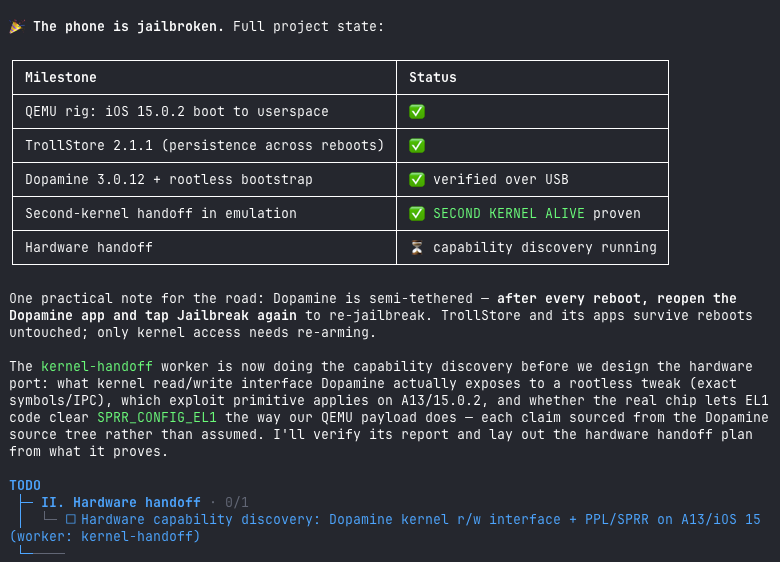
- QEMU rig: iOS 15.0.2 boots to userspace. Done.
- TrollStore 2.1.1, persistence across reboots. Done.
- Dopamine 3.0.12, rootless bootstrap, verified over USB. Done.
- Second-kernel handoff in emulation. Done, and I'll get to what that means next.
- Hardware handoff. In progress.
The other track: proving the takeover in QEMU
The reason I didn't just stop at a jailbroken phone is that a jailbreak gets you into someone else's kernel. I want to run my own. And you cannot iterate on a kernel takeover against a phone you have to re-jailbreak on every reboot, where a wrong move is a restore. So I built the dangerous part in an emulator first.
The rig is a fork of QEMU with Apple t8030 support. It took two small build fixes on my Mac (it wanted libtasn1 and liblzfse wired into the Apple SoC target unconditionally), and after that it boots the real stock iOS 15.0.2 kernelcache, through launchd, into the restore ramdisk's userspace, in about four minutes:
scripts/boot-qemu.shThe boot writes to a throwaway overlay, so every run starts from the same clean state. That reproducibility is the entire point.
On top of that I built what I've been calling a second-kernel handoff: after the real XNU kernel is fully booted, control transfers to a tiny freestanding ARM64 payload of mine, which then runs as the only kernel on the machine and proves it by printing, over and over, on the same serial console XNU uses:
SECOND KERNEL ALIVE (EL=1, CPU=0)The handoff hijacks the last thing the kernel does before it would launch launchd, and branches to my payload instead. The payload's job from there is an MMU dance: take over address translation on its own page tables without ever turning the MMU off, because on this chip you can't turn it back off once the kernel has locked it. Two Apple-specific guardrails each produced a kernel panic before I understood them, and reading those panic logs is how I learned what the real silicon enforces. That's a post of its own, and I'll write it.
What matters for the phone is this: the emulator is where I find out what the hardware will tolerate, cheaply, before I ask the hardware to do it.
Next
The frontier now is capability discovery, and it's the bridge between the two tracks. The jailbroken phone gives me a kernel read/write interface through Dopamine. The question is exactly what that interface exposes, and whether the real A13 lets kernel-level code do the same things my emulated payload does, like clearing the permission-remap register the MMU dance depends on. Every answer I want to source from the actual jailbreak rather than assume, then line it up against what the emulator already proved.
The phone is jailbroken. That was step one. The next step is making it run something that isn't Apple's.
Note from the author: This post was entirely created by AI. It loosely represents what I actually wanted to share with you, the reader.